
.png&w=3840&q=100)

Stop renting your data.
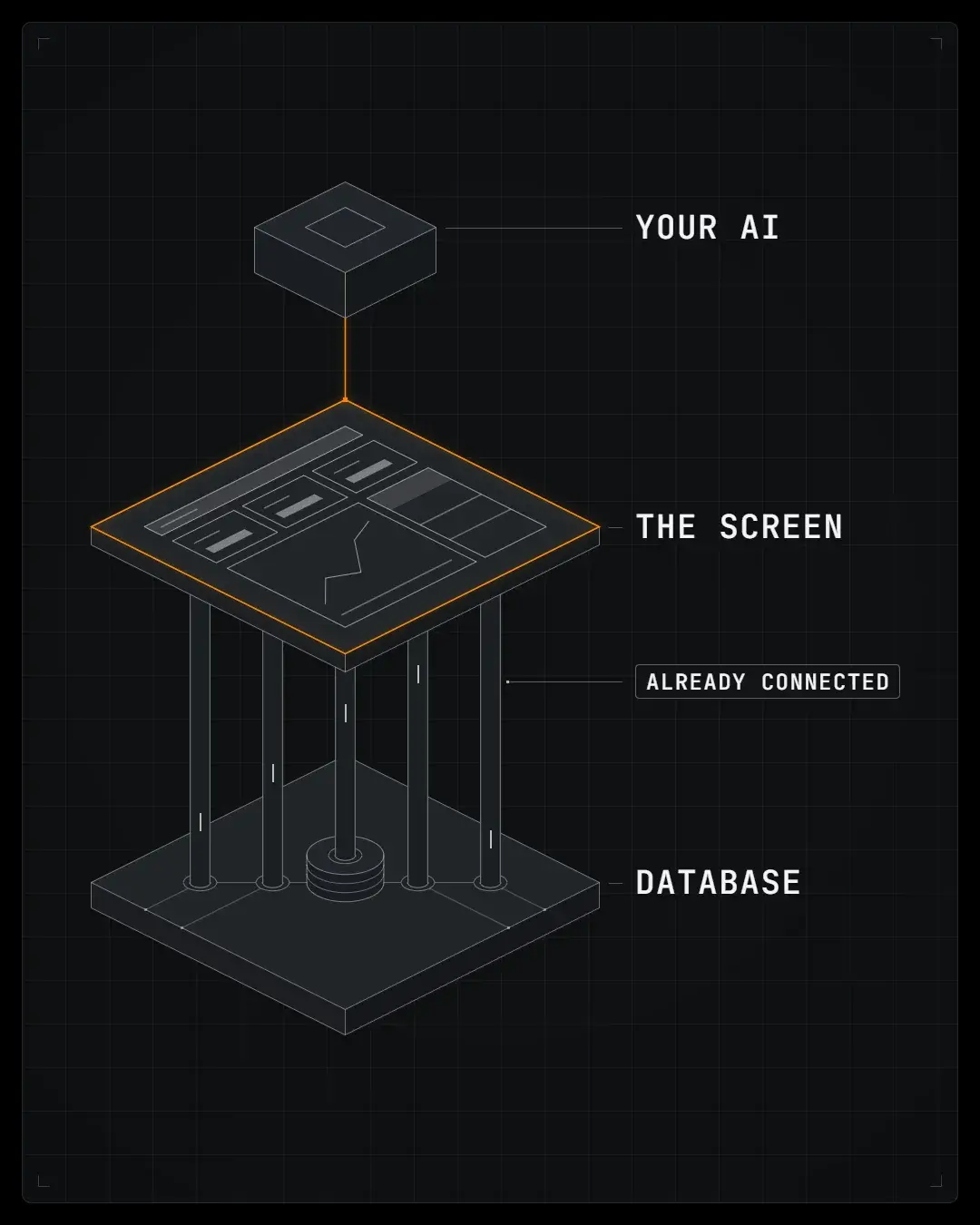
A full multichannel ecommerce reporting system: a database of your whole business, with a dashboard on top and an MCP server built in. It runs on your own computer, and you pay once.

Built by Rich Vaughan, 12 years building ecommerce brands
01 / What you get
Your sales, ads and profit, in one place, connected to your AI.
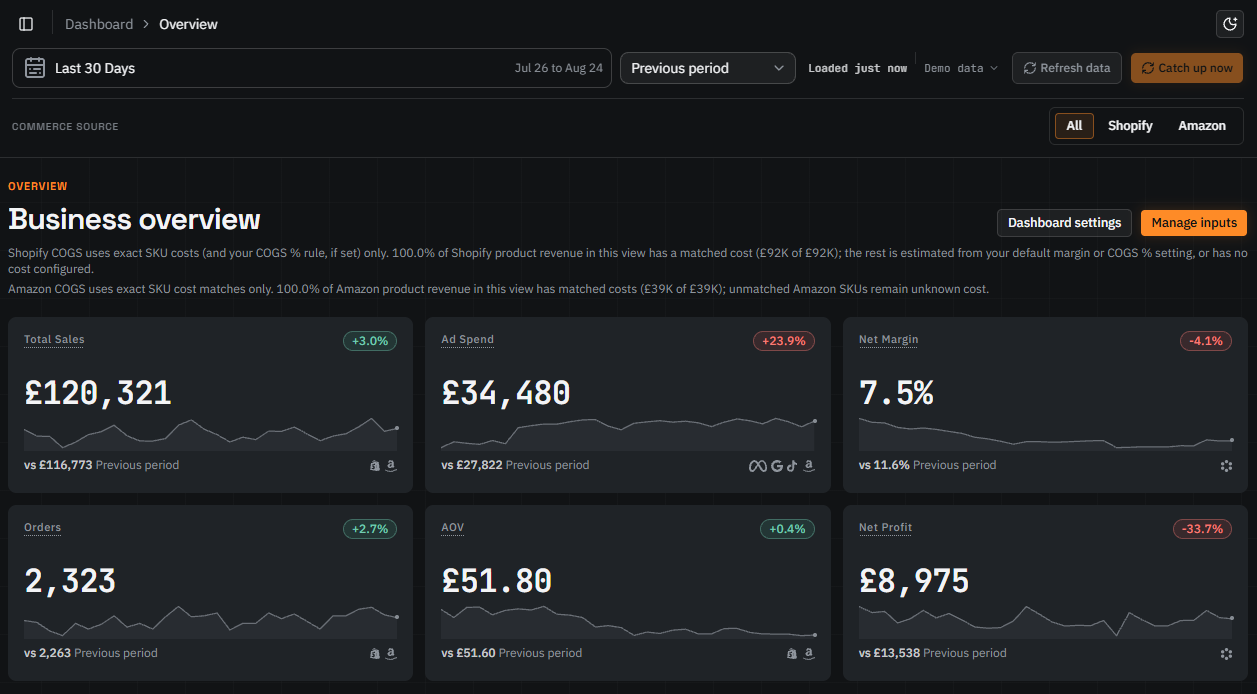
See what you actually made.
Sales, ad spend and net profit across Shopify and Amazon, on one screen. Net profit comes after COGS, ad spend, fees and overheads, worked out for you.
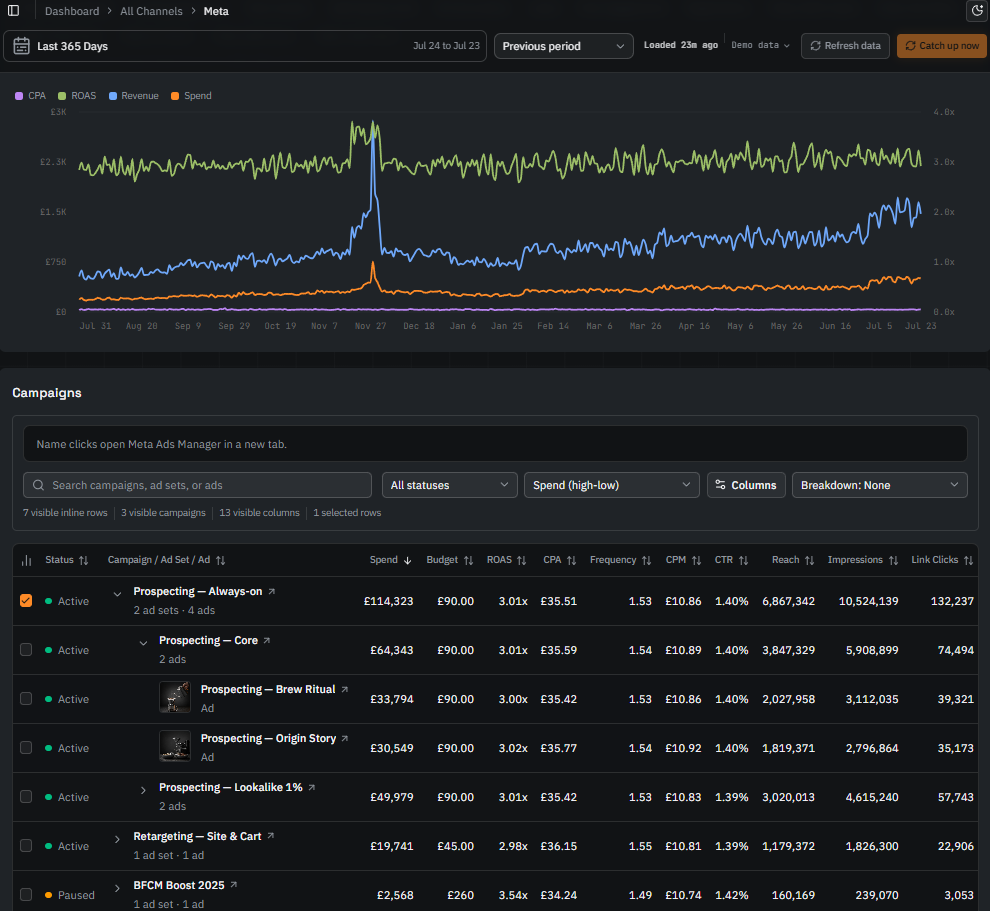
Every ad platform in one place.
Meta, Google, TikTok and Amazon Ads side by side, down to the campaign, next to the sales and profit in your own data.
Ask your AI about the whole business.
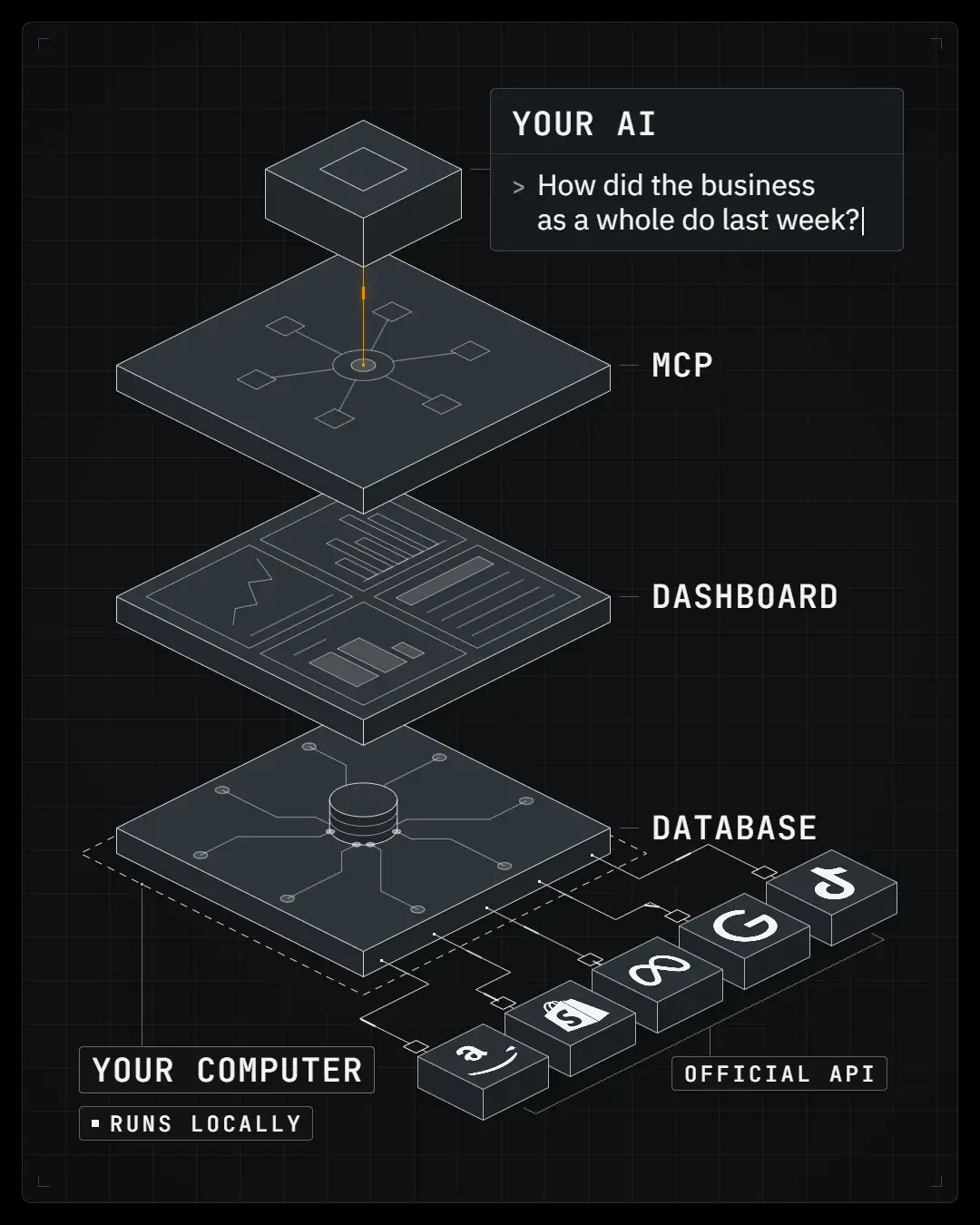
There's an MCP server built in, so an AI tool like Claude Code, Codex or Cursor can check every channel at once and come back with what to fix. It's read only, so your AI can look but can't change anything.
Works with AI tools on your own computer
- Claude Code
- Claude Desktop
- Codex
- Cursor
- Hermes
Go through last month across everything and tell me the three things I should fix, and what you'd do about each one.
abaxar 9 checks: Amazon, Shopify, ad spend, fees, stock
August: revenue £118.3k, net profit £13.6k. Three things to fix:
- 1Best sellers about to sell out on the websiteSix 250g coffees have 9 days or less left, with nothing on order. Amazon holds 129 days of Counting House 1kg.Order from the roaster now.
- 2Amazon ads on 250g coffee barely pay£1,165 of ads for about £376 of profit.Cut them back and move the budget to grinders.
- 3Two discount codes reaching the wrong customers
WELCOME10andBREW20send about £900 a month of discount to returning customers.LimitWELCOME10to new customers andBREW20to brew kits.
Why a database
Each platform's own MCP only sees its own channel, so your AI has to stitch them together on the fly, every time. Ask twice and you can get two answers. Abaxar defines and joins everything in a database first, before your AI takes a peek.
Pay once. It's yours.
It runs on your own computer, and your data stays there with it. No subscription, and £0 every year after.
Also in the dashboard
- Profit
Gross, after ads and after overhead.
- Products
Sales, units and margin for every SKU.
- Customers
Lifetime value by cohort, and how many come back.
- Inventory
Days of cover, and what's about to sell out.
- Amazon
Fees, refunds, payouts and FBA shipments.
- Email marketing
Klaviyo campaigns and flows.
- Funnel
Your Shopify store's funnel, down to the SKU.
- Creative
Spend, revenue and thumbstop for every Meta and TikTok ad.
02 / Getting set up
Set up in an afternoon, guided.
Paste one prompt into your AI coding tool and it has Abaxar running on your computer within minutes. Then Abaxar walks you through connecting each account, getting the API keys as you go.
Step 01
Your copy
Step 02
Your AI coding tool sets it up
Step 03
Connect each account
How to set up Abaxar · 24:44
A video and a written guide for every account
- Shopify5 min
- Klaviyo5 min
- Meta8 min
- Google Ads+ review10 min
- GA410 min
- TikTok+ review10 min
- Amazon Seller+ review25 min
- Amazon Ads+ review25 min
What setup takes, measured
Start the Amazon Seller, Amazon Ads and TikTok applications first, about 10 minutes each, so their reviews run in the background.
First sitting, about an hour: install from one pasted prompt (about 15 minutes), then Shopify (5), Klaviyo (5), Meta (8), Google Ads (10) and GA4 (10).
When the reviews land (Amazon Seller up to 2 business days, Amazon Ads up to 72 hours, TikTok a few days), finish Amazon Seller (25), Amazon Ads (25) and TikTok (10).
About two hours of your own clicking in all, timed from the filmed walkthroughs.
After setup
It's more setup than signing up to a SaaS tool, but you only do it once. After that, there's no monthly bill, you own the system, and I keep it updated.
- Syncs
On its own, hourly by default, while Abaxar's running.
- Catches up
Computer off for a few days? Next time you start it, it fetches everything since the last sync.
- Updates
The dashboard tells you when one's out, and one command installs it. It never touches your data or keys.
- API changes
When a platform changes its API, I fix the connector and ship it as an update, included.
03 / The cost
Everywhere else, you pay every year.
Reporting tools keep the database and rent you everything on top. The day you stop paying, it's gone.
The big reporting tools pull from the same official APIs as Abaxar, into their own servers. Abaxar uses your own credentials, so your accounts go straight into your database, with nobody in between.
€2,721.60. One year of Supermetrics, 2022. It moved the data into a sheet and stopped there. The spreadsheets, the formulas and the reading of it were all still mine.
Abaxar has no attribution modelling. In my experience, a brand under seven figures rarely spends enough on each platform for attribution to be worth what it costs.
| Tool | Every year |
|---|---|
| The platforms | |
| Full dashboards with an AI layer. They price against your revenue, your ad spend or how many channels you connect, so the bill grows as you do. | |
| NorthbeamAttribution and creative analyticsStarter, from $1,500 a month · northbeam.io/pricing | $18,000 |
| Triple WhaleDashboard, AI operator, automationsAutomate, annual prepaid · triplewhale.com/pricing | $7,490 |
| Peel InsightsRetention and cohort analyticsEssentials, $449 a month billed annually · peelinsights.com/pricing | $5,388 |
| MerchantSpringMarketplace analytics and dashboards, 120+ channelsSeller, $319 a month billed annually · merchantspring.io/pricing | $3,828 |
| Triple WhaleDashboard, attribution, custom metrics and SQLFoundation, annual prepaid · triplewhale.com/pricing | $2,190 |
| LifetimelyProfit, LTV and retention analytics, Shopify-firstM, $149 a month, for 501 to 3,000 orders a month · useamp.com/pricing | $1,788 |
| Polar AnalyticsDashboard, attribution, AI agents, 45+ connectorsbook a demo, quoted against your GMV · polaranalytics.com/pricing | No published price |
| The pipes | |
| They move your data somewhere you can use it and stop there. You still build the thing that reads it, and you still pay for wherever it lands. | |
| Funnel.ioMarketing data pipeline, priced by connectors and refresh rateStarter, from $300 a month billed annually · funnel.io/pricing | $3,600 |
| SupermetricsSeven sources into a sheet or a warehouseGrowth, €159 a month billed yearly · supermetrics.com/pricing | €1,908 |
| ImprovadoData pipeline with an MCP tier for AI clientsMCP Only, $100 a month. Advanced and Enterprise are quoted · improvado.io/pricing | $1,200 |
| Windsor.aiSeven sources, unlimited destinationsStandard, $99 a month billed annually · windsor.ai/pricing | $1,188 |
| The single-job tools | |
| Cheap, and good at the one thing they do. None of them puts your whole business in one place, which is the job this page is about. | |
| TrueProfitShopify profit onlyBasic, $35 a month · trueprofit.io/pricing | $420 |
| SellerboardAmazon profit onlyStandard, billed annually · sellerboard.com | $179 |
| £249 once, the whole codebase yours to keep | £0after the first payment |
The cheapest published route to a year, usually paid up front, read off each vendor's own pricing page on 25 July 2026. Currencies as each vendor publishes them.
What they charge extra for
The prices above are the base plan. This is the part you find later.
| Charged extra | Their price | Abaxar |
|---|---|---|
| Your data in a warehouse you ownTriple Whale, Data Warehouse Sync add-on, at $0 to $250K GMVAbaxar It is the product. Your database is a file on your machine | $4,990 / year | It is the product. Your database is a file on your machine |
| Custom metrics, your own SQLTriple Whale, Foundation tier and upAbaxar Your database and your code. Define anything you like | $2,190 / year | Your database and your code. Define anything you like |
| AmazonLifetimely charge for it on top of any paid plan, for sales dataAbaxar Amazon Seller and Amazon Ads, both included, in the same database | +$75 / month | Amazon Seller and Amazon Ads, both included, in the same database |
| Every extra data sourceSupermetrics and Windsor.ai both tier by how many you connectAbaxar Every connector, present and future, included | A higher plan each time | Every connector, present and future, included |
| The AI layer, once it is meteredLifetimely say AI usage above a monthly allowance "will be billed by tokens" in the near futureAbaxar Runs on your machine, against an AI subscription you already pay for | Included today | Runs on your machine, against an AI subscription you already pay for |
| What happens when your revenue doublesPriced against GMV, ad spend or monthly orders, so the bill follows you upAbaxar Nothing happens. It is already yours | Your bill goes up | Nothing happens. It is already yours |
04 / Why I built it
The tool I've always wanted.

Rich Vaughan
12 years building ecommerce brands
I started building Abaxar for my latest brand, Nowhere Fast Gear. As AI coding got better, I realised I could build the tool I'd always wanted.
So I did, and that led me to launch The Rich Stack and my YouTube channel.
People like me: ecom founders who are hands-on in the business, who already use AI heavily.
Could you build it yourself?
Probably. I put together a full build spec and pasted it across multiple models to estimate the time and cost.
170 to 600 hours
Their estimate of the build time.
About $200 to well over $1,000
Their estimate of the AI bill, if everything goes well.
Well over 800 hours
Mine, at this point. And I don't even want to know my token usage.
That's hundreds of hours away from running your business. Or it's £249, once, and I keep it maintained and updated.
Fancy a look under the hood?
I'll email you the full build spec, written for your AI to work from. Build your own, or see what's inside Abaxar before you buy. Plus, a whole bunch of tips and what to watch out for!
Unsubscribe any time, from any email. How your address is handled
05 / Get Abaxar
One payment. Yours to keep.
£249
One payment · £0 every year after
Every data connector, present and future, plus all updates, owned forever.
Full refund for 30 days, no questions
What you get
- The full source code, yours to keep
- The dashboard
- The MCP server, built in
- Eight connectors today, and every one that follows
- The setup guide: a video and a written guide for every account
- All updates
- Licence
- Your company, and the brands under the same ownership
- Delivery
- Read-only access to a private GitHub repository once you connect your GitHub account. A free account is enough
- Help
- Message me if you get stuck
- Subscription
- None. Nothing to cancel
- Refund
- Full refund for 30 days, no questions. Polar pays it back the way you paid, and repository access ends with it
Paying for it
- Charged in pounds, by Polar, who sell Abaxar on my behalf.
- Every order comes with a PDF invoice, and you can add your company details to it.
- The full terms are in the terms of sale and refund policy.
Want it set up for your whole team? I can build it for you, for £2,500 in one payment. See how it works
Fancy a look under the hood?
I'll email you the full build spec, written for your AI to work from. Build your own, or see what's inside Abaxar before you buy. Plus, a whole bunch of tips and what to watch out for!
Unsubscribe any time, from any email. How your address is handled
06 / Make it yours
Ready out of the box. Built to change.
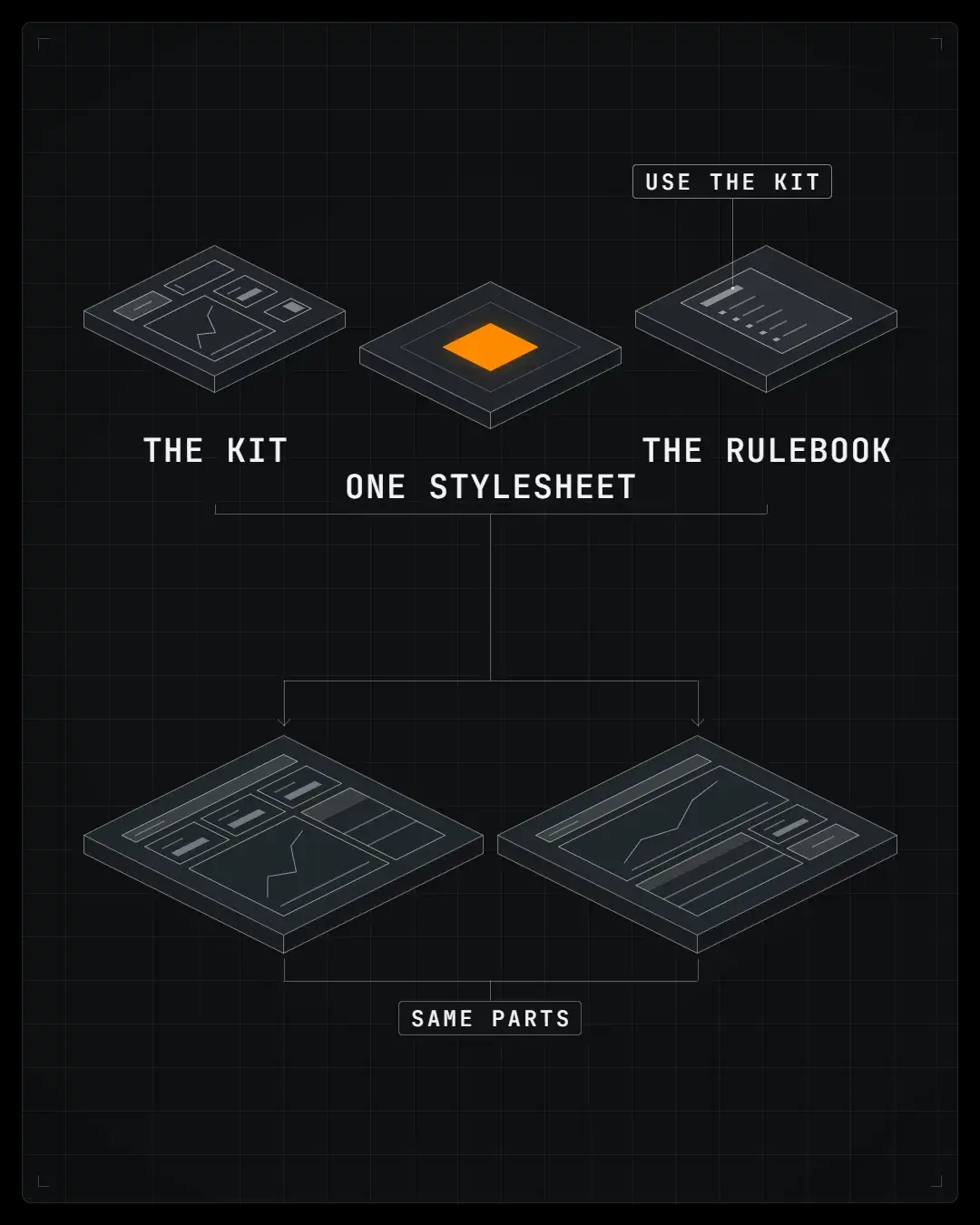


The UI is a kit of tried and tested parts, one colour scheme, and a rulebook telling your agent to use the kit.
Screenshot a dashboard you already use, and your AI rebuilds it in Abaxar, already wired to your numbers.
A page you wish existed? Tell your coding agent, and it builds it next to everything else.
Or extend the foundation itself: other marketplaces, accounting, fulfilment, supplier lead times.
07 / Questions
Before you buy
- Do I need to be technical?
- You need to be happy following a step-by-step guide. You paste one prompt into an AI coding tool and it does the install. Most of the time goes on getting API keys from each platform, with a video for every one.
- Where does my data live?
- Nobody else holds it. Abaxar keeps everything in one database file on your computer, and your API keys sit on that same machine. There is no Abaxar server in the path.
- Which AI tools work with it?
- AI tools on your own computer that speak MCP. Claude Code, Claude Desktop, Codex and Cursor all connect. Abaxar's MCP only answers on your own machine, so web and phone apps can't reach it.
- Why not just plug my AI into each platform's own MCP?
- Some of the platforms have their own MCPs now, so it's a fair question. What did you actually make last month? No platform's MCP can say, because each one only sees its own channel. Your AI has to stitch them together on the fly, every time. Ask twice and you can get two answers. So Abaxar defines and joins everything in a database first, before your AI takes a peek. It runs alongside the platforms' own MCPs: the numbers come from Abaxar, and any change goes through the platform's own.
- Can my AI change anything through Abaxar?
- No. Every tool on Abaxar's MCP is read only. When you want a change made, like the discount codes above, your AI makes it through that platform's own MCP.
- What if I get stuck?
- Every account has a video and a written guide, and your AI coding tool can read the codebase and walk you through any step. If you are still stuck, message me.
Will it run on my computer?
Which accounts can I connect?
Does Abaxar do attribution?
Does it really get my Amazon data out?
How fresh are the numbers?
What if my computer's off for a few days?
Does it handle VAT and sales tax?
What happens when a platform changes its API?
What does it cost to run?
Can I use it for more than one brand?
Can my whole team use it?
How do I get it after paying?
How does the refund work?
08 / The moneyTax, currency and fees
Profit is shown without tax, wherever you sell: VAT, GST or US sales tax, using the tax each order reports, including the tax Amazon collects for you. Selling in the UK or EU? Tell Abaxar whether you're VAT-registered and it also counts the VAT you can't reclaim on Amazon fees and ad invoices.
Net profit is your sales after refunds, less cost of goods, ad spend, platform fees, shipping and handling, and the overhead you set.
Tax
- Your settings
- A Tax card in Settings holds your VAT status for each country: not registered, registered, or on the flat-rate scheme at your percentage. Each status has a start date, so a registration partway through the year counts from that day.
- Until you set it
- Abaxar guesses your home country from your Shopify store and Amazon account, treats you as not registered, and labels both as guessed from your data.
- VAT-registered
- If Amazon or Shopify left the VAT off a sale in a country where you're registered, Abaxar takes it out at that country's rate, with per-SKU rates for reduced and zero-rated products.
- Flat-rate scheme
- Abaxar takes your flat percentage off the VAT-inclusive sale, and counts the VAT on Amazon and Shopify fees as a cost.
- Ad invoices
- Set the VAT and any surcharge each ad account's invoices carry, such as Google's and Meta's UK fees. They count as their own cost line, so ROAS and CPA still match each platform.
- US sales tax
- Sales tax, and the marketplace facilitator tax Amazon collects, stay out of revenue and profit.
Currency
- Display currency
- Pounds, euros, or US, Canadian or Australian dollars, one per workspace, chosen in Settings. Change it later and your whole history is re-rated.
- Exchange rates
- European Central Bank reference rates, fetched from the free Frankfurter service as Abaxar syncs. No account or key needed.
- Rate date
- Each order converts at the rate for its order date. The ECB publishes on working days, so a Saturday order uses Friday's rate.
- Several currencies
- Each Amazon marketplace reports in its own currency, and every amount converts into yours before anything is added up. Shopify Markets sales arrive in your store's currency.
- No rate
- UAE dirhams and Saudi riyals convert through their fixed US dollar pegs. An amount in any currency without an ECB rate shows unconverted, with a flag on screen.
- Originals
- Every order keeps its original amount, its currency and the rate used, beside the converted figure. Amounts are stored unrounded and rounded only on screen.
- Your costs
- Entered in your display currency. Shopify's own inventory costs convert from your store's currency.
Fees
- Amazon fees
- Referral, FBA fulfilment, storage, removal, disposal, inbound, prep and digital services fees, plus coupons, deals, chargebacks and A-to-z claims, all come off Amazon profit.
- Fee refunds
- Fee rebates, and the fees Amazon hands back on a refund, reduce your costs.
- Shopify fees
- Payment processing fees, read from each order. Add your Shopify plan and app charges as monthly overhead.
- Ad spend
- Meta, Google, TikTok and Amazon Ads spend, each counted once. Without Amazon Ads connected, your Amazon ad invoices count instead.
Refunds and returns
- Shopify refunds
- Come off revenue net of the tax refunded, refunded shipping included, dated to the original order. A June order refunded in October lowers June.
- Amazon refunds
- Refunded sales come off revenue, and Amazon's refund administration fee counts as a cost.
- Returned stock
- An Amazon unit returned to sellable stock gets its cost of goods back, and a damaged one keeps it. Shopify refunds count every unit as restocked.
Costs
- Cost of goods
- Per SKU with a start date, as a percentage of sales, from Shopify's inventory cost, or a default margin. Amazon SKUs sit in the same cost editor, and a SKU with no cost is flagged.
- Shipping, handling
- For Shopify, a flat amount per order or per item, or the shipping your customer paid. Amazon uses its real fulfilment fees.
- Overhead
- One monthly figure, spread across the month's days and split across your channels by each day's revenue.
- Reimbursements
- Amazon's reimbursements for lost or damaged stock stay out of profit. Cost of goods counts only units you sold, so that stock was never in your costs.
- Left out
- Income tax, and anything you haven't entered as overhead, like apps, subscriptions and agency fees.
09 / The engineSpecs for nerds
Stack
- Framework
- Next.js, App Router
- Language
- TypeScript end to end
- UI
- shadcn/ui on Tailwind CSS, Recharts for charts
- Runtime
- Node 20.9 or newer
- Platforms
- macOS, Windows, Linux
Database
- Engine
- one libSQL file on your machine
- Schema
- built from empty by a chain of SQL migrations
- Pipeline
- raw platform data, then fact tables, then the contracts the dashboard reads
- Infrastructure
- no database server, no provider account
Sync
- Scheduler
- in-process, inside the running dashboard
- Interval
- off, hourly, 3 hours or daily; hourly by default
- On demand
- the Catch up now button
AI data layer
- MCP server
- built in, at /api/mcp
- Tools
- a fixed set of read-only tools, each wrapping a dashboard loader
- Clients
- MCP clients on the same machine
Correctness
- Metrics
- a registry defines every KPI once
- Checks
- the formula shown is tested against the number computed
- Tests
- a Vitest suite, and CI on every change
Delivery and updates
- Access
- a private repository, you as a read-only collaborator
- Updates
- npm run update, with an update check in the dashboard
- Your data
- local.db and .env.local are gitignored, so updates never touch them
Security posture
- Credentials
- plaintext in .env.local, behind your operating system's file permissions
- Custody
- keys go from your machine to each platform, and nowhere else
- Network
- the app listens on 127.0.0.1; a guard rejects non-local MCP calls
- Beyond localhost
- put real authentication in front of it first
Fancy a look under the hood?
I'll email you the full build spec, written for your AI to work from. Build your own, or see what's inside Abaxar before you buy. Plus, a whole bunch of tips and what to watch out for!
Unsubscribe any time, from any email. How your address is handled

No subscriptions, and no renting your data.
Full refund for 30 days, no questions
Fancy a look under the hood? Get the build spec